AeroLab
Performance analysis for small fixed-wing UAVs

Will it fly? Know before you build.

Describe the aircraft — span, airfoil, motor, payload — and read the answer as you type: cruise and max speed, range, endurance, climb, ceiling, stall. Every curve recalculates live, with physics, not guesswork.

Free · no account · no install · opens instantly in your browser

Fig. 01 — Power required vs. available ISA · sea level
15 25 35 V (m/s) P (W) V_stall V_max P_avail P_req cruise
Cruise
22.4 m/s
Range
48.2 km
Endurance
61.5 min
Ceiling
3,880 m
Sample output: the power-curve chart and headline readouts AeroLab computes as you move a slider. Values shown are illustrative.
§ 01 — Loop

Change an input. Read the result. Adjust.

That is the whole workflow. No compute button, no queue, no file to save.

  1. STEP 1

    Set the parameters

    Sliders, numeric fields and catalogs for everything that defines the aircraft: wing geometry, airfoil, weights and payload, electric or gasoline powertrain, propeller, tail, and the mission’s altitude and temperature.

  2. STEP 2

    Read the diagrams

    Charts, readouts and the operating table update on every change — plus feasibility checks that say what is wrong and what to do: “engine too small”, “tail volume low”.

  3. STEP 3

    Iterate & share the link

    The entire design is encoded in the URL. Sharing a design is sharing a link — a colleague opens it and sees exactly your aircraft, live.

§ 02 — The instrument

The whole lab on one screen.

Parameters on the left. Live diagrams, readouts and feasibility on the right. Nothing hides behind menus.
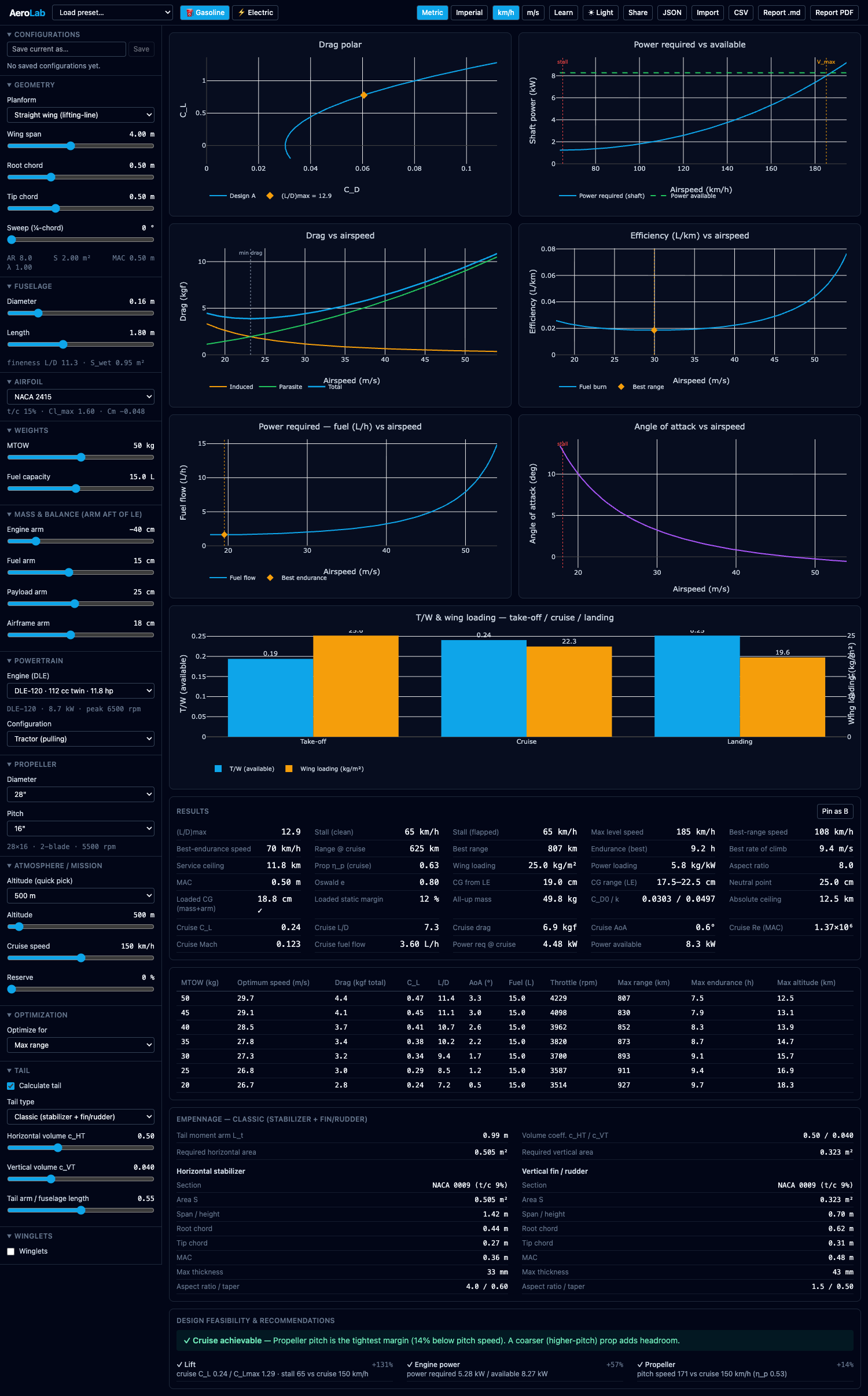
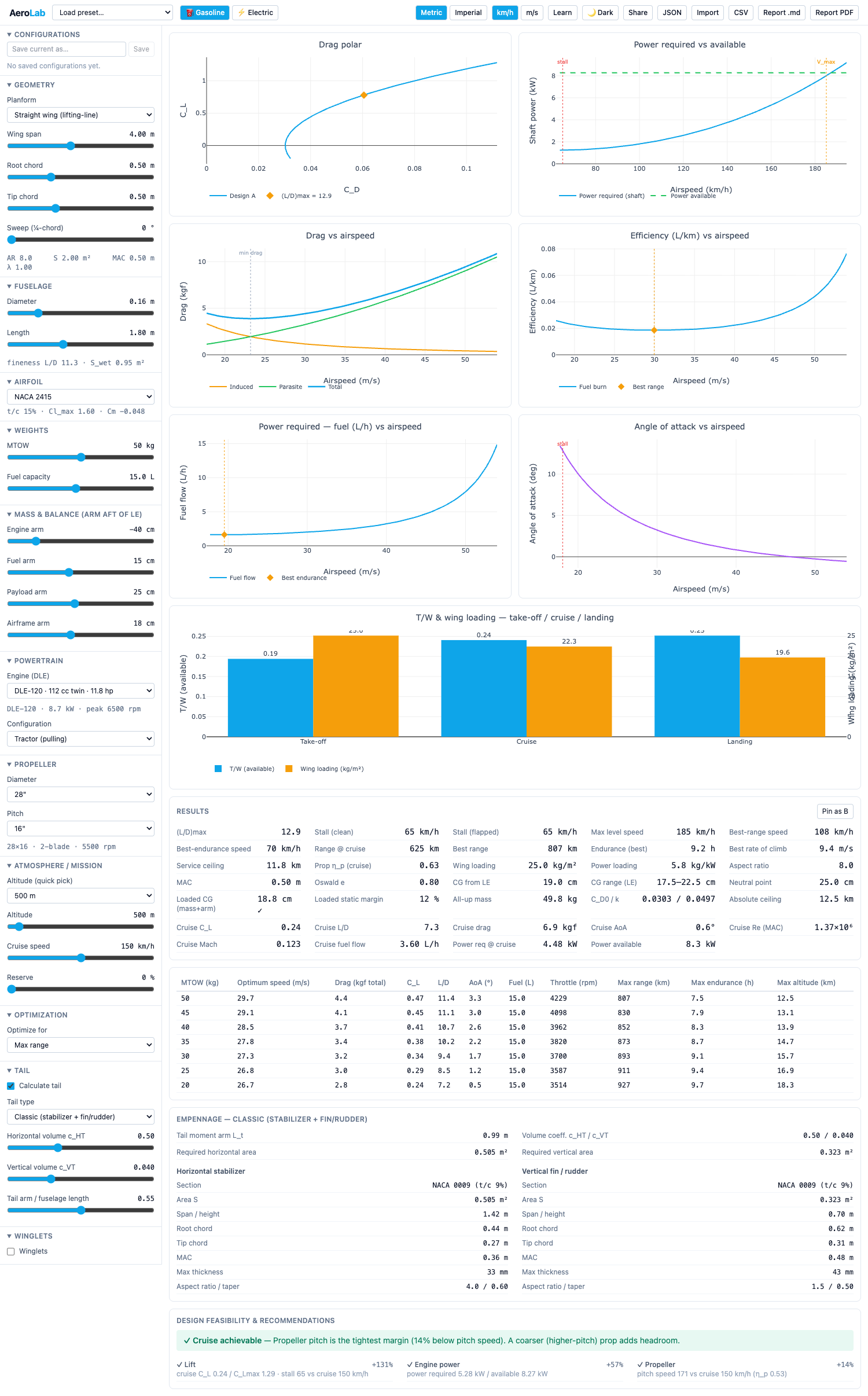
AEROLAB — FULL WORKSPACE ↕ scroll
The AeroLab interface in dark mode: a column of parameter sliders and inputs on the left; charts, numeric results and feasibility checks filling the rest of the window. The AeroLab interface in light mode: a column of parameter sliders and inputs on the left; charts, numeric results and feasibility checks filling the rest of the window.

One design loop: the inputs panel, the charts grid, the results readouts and the feasibility verdicts — all reacting to the same slider.

§ 03 — Scope

Everything between the napkin and the workshop.

The estimates you would otherwise script in a spreadsheet or MATLAB — as one live instrument.

In

Describe the aircraft

Every input is a slider, field or catalog pick.

  • Wing geometry — span, chord, sweep, taper
  • Airfoil selection — NACA section catalog
  • Fuselage and tail & winglets
  • Weights & payload
  • Powertrain — electric or gasoline, with motor and engine catalogs
  • Propeller
  • Atmosphere & mission — altitude, temperature
Out

Read the performance

Updated instantly, on every change.

  • Interactive charts — drag polar, power curves, efficiency and more
  • Results panel — cruise & max speed, range, endurance, climb, stall
  • Service ceiling
  • Operating table — the numbers across the speed sweep
  • Tail sizing — empennage geometry that fits the wing
Check

Trust the design

Verdicts, not just numbers.

  • Feasibility checks — pass/fail on the constraints that matter
  • Concrete recommendations — “engine too small”, “tail volume low”
  • Optimization mode — let AeroLab search the parameter space for you
§ 04 — Method

Open the hood. The math is on display.

  • Analytic models, not a black box.

    Classical performance equations evaluated exactly — which is why every curve can recompute in milliseconds, live under your cursor.

  • The formulas are shown, rendered, in the app.

    You can check every step against your own notes. If you disagree with a model, you can see precisely what it assumes.

  • Catalog data for real hardware.

    Motors, engines, propellers and NACA airfoil sections come from built-in catalogs — pick parts, not abstractions.

  • Everything runs in your browser.

    Nothing to install, no project files. The complete design lives in the URL.

A few of the models inside
CD = CD0 + CL2π · AR · e Drag polar
(L/D)max = 12 √(k · CD0) Best glide
Vstall = √2 Wρ · S · CL,max Stall speed
Three of the relations AeroLab evaluates on every input change — and renders inside the app, next to the results they produce.
§ 05 — Audience

Built for people who check the units.

Engineers

UAV engineers & drone teams

Replace the spreadsheet you keep re-deriving. Sweep a parameter in seconds, and send the trade study to a colleague as a link.

Researchers

Aerospace researchers

Fast, transparent parameter studies with the governing equations in view — and results anyone can reproduce from the same URL.

Builders

Students & serious builders

Know whether the motor is big enough before you order it. The guide explains every term in plain language.

§ 06 — Pricing

Free to use. Credits for the heavy runs.

No subscription — AeroLab is pay-per-Run for the work that needs a server, and free for everything else.

Free

Available now

The full lab, in your browser.

  • No account. Open the app and start designing.
  • No time limit, no run limits, no quotas.
  • All charts, results, feasibility checks and optimization.
  • A defined set of premium parameters is locked.
Open AeroLab

Credits

Coming soon

Prepaid — spent per Run, as you go.

  • Top up a Wallet with prepaid Credits.
  • Each high-fidelity, server-computed Run debits Credits.
  • Unlocks the premium parameters.
  • No subscription. Nothing recurring; Credits wait until you need them.

Pricing not final — published when the Wallet ships.

Your napkin math — live, visual, shareable.

The first answer is one slider away. If it doesn’t earn its place in your toolchain, close the tab; there is no account to delete.

Free · no account · no install · opens instantly in your browser